Goodbirch

Now on the Shopify App Store

Spin to win for Shopify

A prize wheel that protects your margin.

Visitors spin with their email and win a discount. Every code works once, only for the email that won it, and the wheel never gives away more than the budget you set.

Free plan to start. Growth and Pro come with a 14-day free trial.

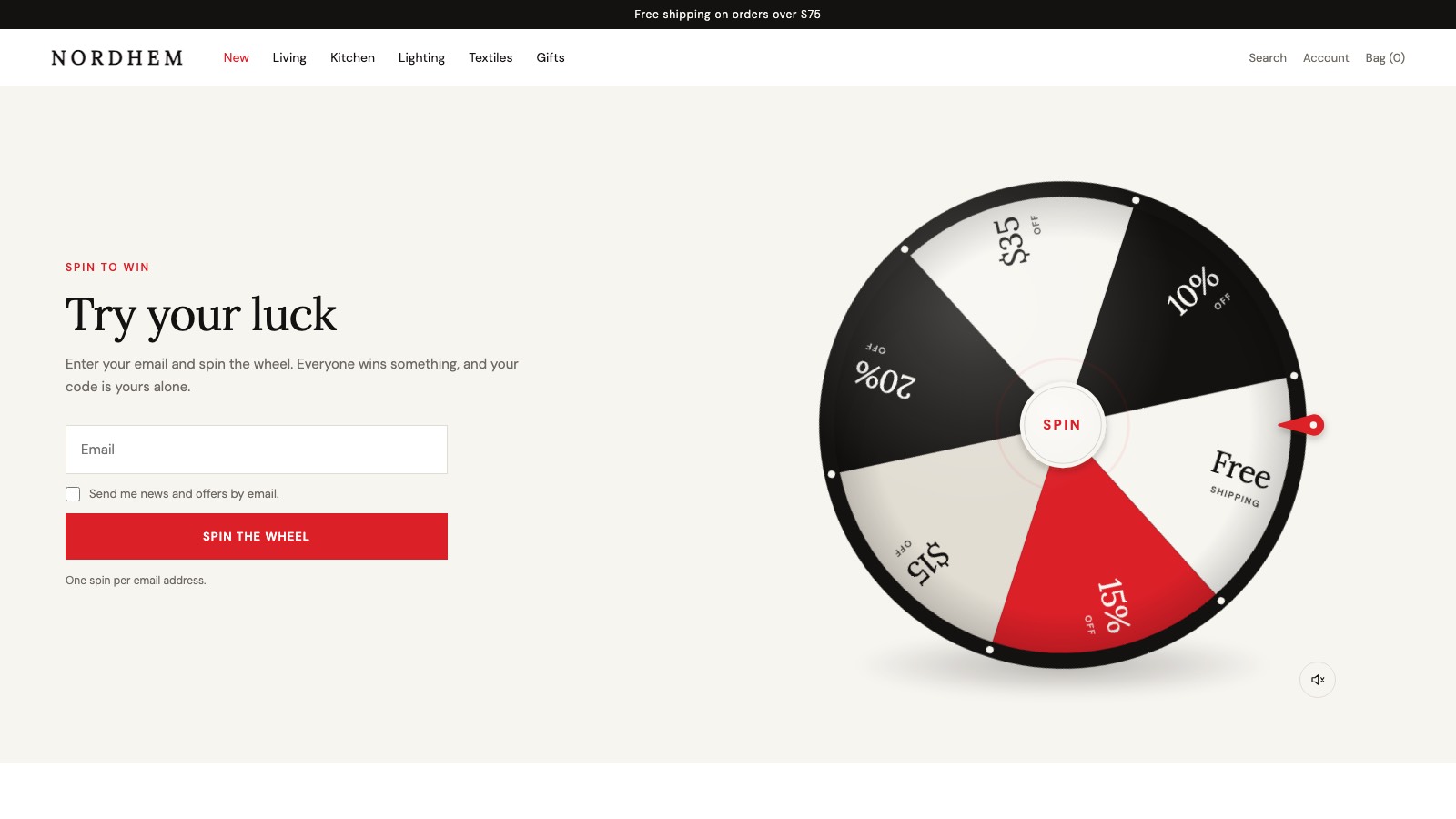
The Tickwheel prize wheel on a store's home page, next to an email field and a Spin the wheel button
All 17

This is the real Tickwheel wheel, running in your browser. Type any email and spin, or flick the wheel.

Demo. What you type stays in your browser: no email is sent and no code is made.

1

Each code works once, and only with the email that won it. Nothing to share on coupon sites.

0

Dollars given away beyond your budget. Odds, stock and the cap are enforced on our server.

17

Ready campaigns: Black Friday, Christmas, a welcome offer and more, each with its own look.

In a minute

A code of their own, and a budget that holds

A spin on a store, the code only the winner can use, the same inbox caught spinning twice, the budget cap at work, and the app: templates, odds and results.

1:15, no sound needed. It plays from this site: no YouTube, no tracking.

Try to break the budget

Send a thousand visitors at one campaign and watch the same draw the wheel above uses. Rare prizes sell out and their chance moves to the rest; when a prize would pass your cap it leaves the wheel; when nothing fits, the campaign ends itself. Set the cap as low as you like.

Visitors0
Given away$0 of $6,000
Prizes in the simulated campaign
PrizeCosts youChance nowWon

Ready.

    The “Everyone wins” template with a $60 average order and $8 shipping, the cost estimates the app suggests. Stock is set tighter than the template's so sell-outs show.

    Live in three steps

    Tickwheel does one job: a prize wheel that grows your email list without costing more than you planned. Everything is set in your Shopify admin; there's no code to add to your theme.

    1. Pick a campaign

      Start from one of 17 templates. Each comes with a look, prizes and chances that make sense together, in your currency.

    2. Set the rules

      Change any prize, its chance and how many can be won. Add a budget cap, dates and how long codes last. A live preview spins as you edit.

    3. Put it on your store

      Turn on the pop-up with rules for pages, devices and visitors, or add the wheel as a block to any page. Then press Activate.

    17 campaigns, ready to spin

    A look, the texts and a prize recipe for every season. Seasonal templates count down to their date in the app. Try any of them on the wheel at the top of the page.

    • Spin to win

      Try your luck

      Everyday · 6 prizes

      Everyone wins

      Six prizes, every spin wins. The classic for growing your list.

    • Spin to win

      One lucky winner takes the grand prize

      Everyday · 5 prizes

      One big prize

      Small prizes or "next time" for most; one rare grand prize people talk about.

    • Spin to win

      Try your luck

      Everyday · 3 prizes

      Simple

      Three prizes, nothing to set up. Live in two minutes.

    • Welcome

      Spin for your first order

      Everyday · 4 prizes

      Welcome offer

      A first-order discount for new visitors, framed as a welcome.

    • The club

      Join and spin

      Everyday · 3 prizes

      Join the club

      For newsletter sign-ups: the spin is the thank-you for joining.

    • Spin to win

      A little luck today

      Everyday · 4 prizes

      Nordic calm

      Quiet, design-led, small prizes. Suits interiors, fashion and gifts.

    • We are open

      Spin to celebrate

      Launch · 6 prizes

      Grand opening

      Bright and bold for a new store, a new collection or a relaunch.

    • Black Friday

      Spin for up to 40% off

      Seasonal · 5 prizes

      Black Friday

      Black and gold, bigger discounts, limited stock on the best ones.

    • 11.11

      Singles' Day spin

      Seasonal · 5 prizes

      Singles' Day 11.11

      Red and white for 11.11, the biggest shopping day of the year in many markets.

    • The Christmas wheel

      Merry Christmas

      Seasonal · 5 prizes

      Christmas

      Pine green, berry red and gold, with one Christmas gift as the grand prize.

    • Advent

      Today's little gift

      Seasonal · 4 prizes

      Advent

      Midnight blue and candle gold. Run it through December as a daily ritual.

    • Happy New Year

      Start the year lucky

      Seasonal · 6 prizes

      New Year

      Night sky and champagne gold to start the year.

    • Valentine's Day

      Something lovely

      Seasonal · 3 prizes

      Valentine's Day

      Rose and red for gifts to someone special (or yourself).

    • Spring is here

      Fresh for spring

      Seasonal · 6 prizes

      Spring

      Fresh green and sunshine yellow for new-season arrivals.

    • Mother's Day

      For mum

      Seasonal · 3 prizes

      Mother's Day

      Soft rose and sage for gifts to mum.

    • Summer sale

      Sun and summer deals

      Seasonal · 5 prizes

      Summer sale

      Sea, sun and sorbet colours for the summer sale.

    • Halloween

      Trick or treat?

      Seasonal · 5 prizes

      Halloween

      Pumpkin, night and a little purple. Trick or treat?

    Built for the part after the spin

    Most spin-to-win pop-ups hand out a code anyone can use and hope for the best. Tickwheel is built around what that code costs you.

    Prizes and chances

    You set the odds. The server keeps them.

    Percent or amount off, free shipping, a free product, a gift, or “next time”. Give each one a chance, a stock and what it costs you. The odds bar and the budget forecast show what 1,000 spins will give away before you go live.
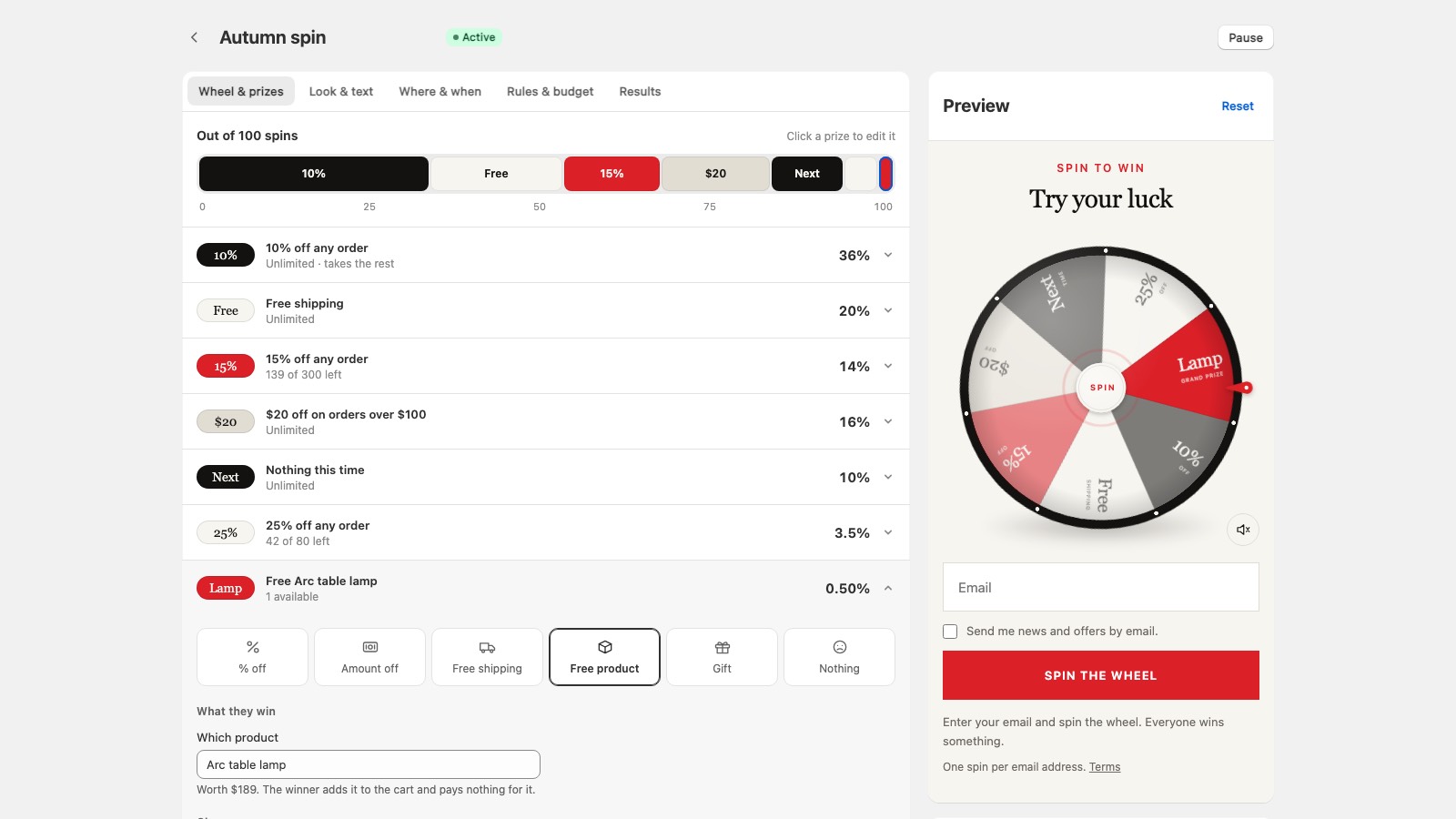
    The prize editor: an odds bar across the top, each prize with its chance and stock, and a live preview of the wheel

    Where and when

    A pop-up that knows its place

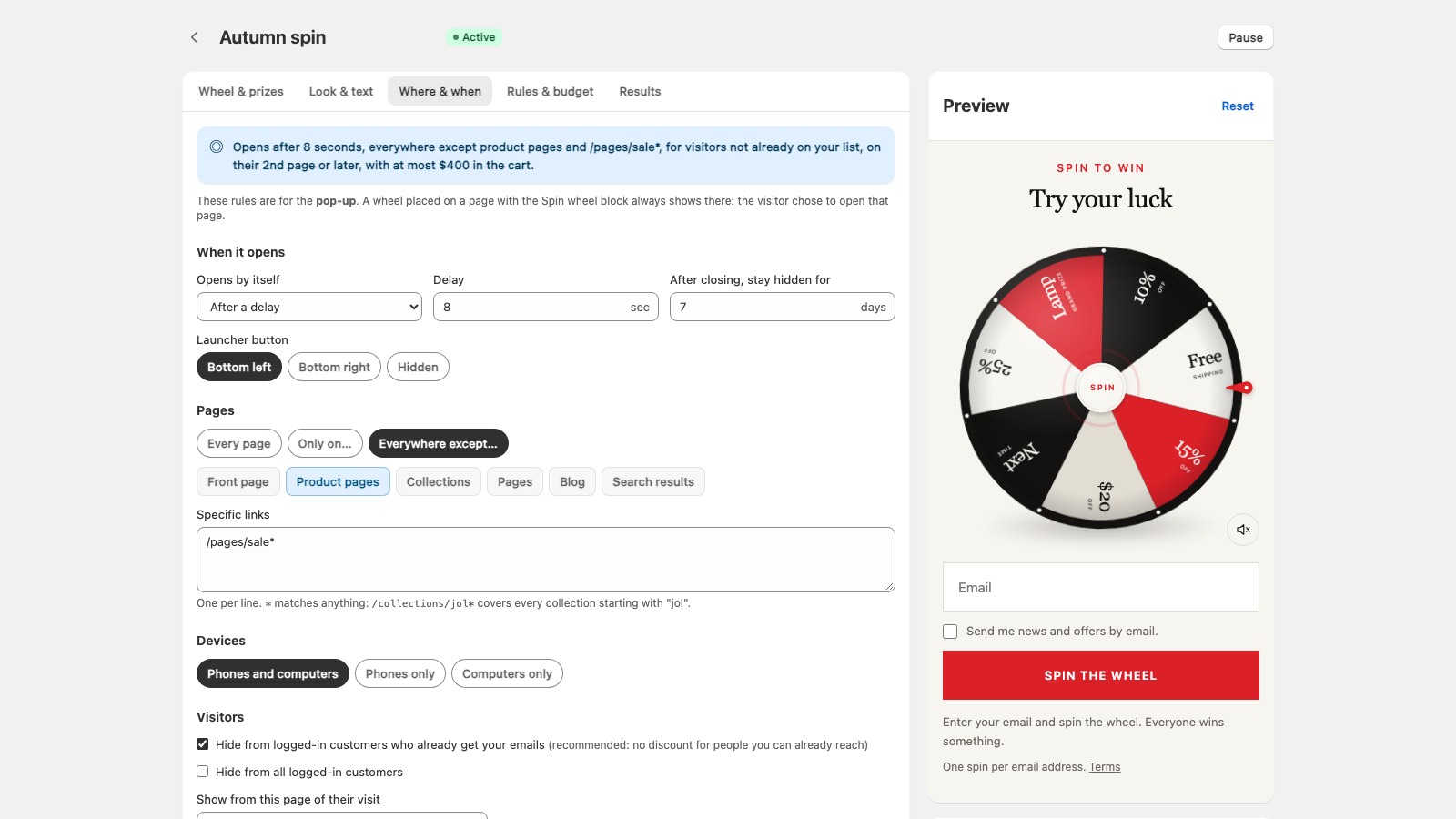
    Open it after a delay or when someone is about to leave. Show it on the pages that matter, on phones or computers, and only to people who aren't on your list yet. It stays closed for as many days as you choose.

    Pop-up rules: when it opens, on which pages and devices, and which visitors see it

    Results

    Spins, codes used and the money they made

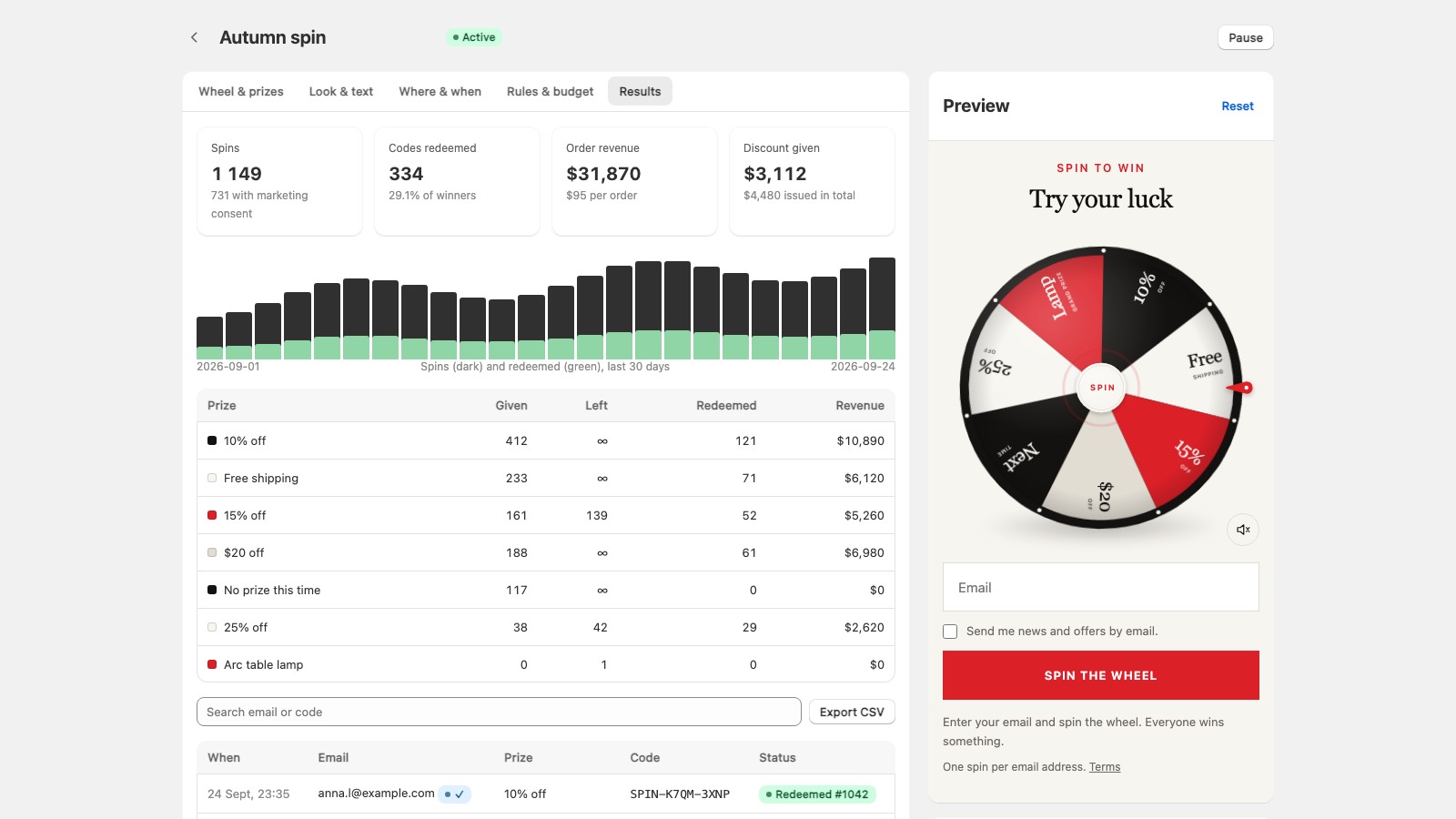
    Every campaign counts its spins, the codes that were used and the orders they came with, prize by prize. Search any email or code, and export it all as CSV.

    Campaign results: spins per day, codes redeemed, order revenue and a table of prizes

    And the rest

    • Made for phonesThe email field, the button and the wheel fit on the first screen. Flick the wheel to spin it.
    • Klaviyo and MailchimpEvery spin, code and sign-up goes to your own email flows as well.
    • A prize emailWinners get their code by email too, in their language, from your shop's name.
    • Sign-ups that countWinners become Shopify customers, tagged by campaign. Only those who tick the box are subscribed to marketing.
    • Ten storefront languagesEnglish, Danish, Swedish, Norwegian, Finnish, German, Dutch, French, Spanish and Icelandic. Every text can be changed.
    • Tidy codesCodes that were never used are removed after they expire, so your discount list stays clean.
    • Light on your storeThe wheel loads after your page and sets no cookies. The bot puzzle only runs once someone starts to play.

    Pricing

    Pay for spins, not page views

    Every plan has every feature. Pop-ups that open without a spin, and bots that are stopped, never count.

    Free

    $0

    To try it on your store

    • 200 spins a month
    • 1 live campaign
    • A small Tickwheel mark on the wheel

    Most shops

    Growth

    $14.99a month

    14 days free

    • 3,000 spins a month
    • 3 live campaigns
    • No Tickwheel mark

    Pro

    $39a month

    14 days free

    • Unlimited spins
    • Unlimited live campaigns
    • No Tickwheel mark

    Billed by Shopify, on your Shopify invoice. Free on development stores.

    Questions

    Can a winner share their code?

    They can, but it won't work for anyone else. Each code is a Shopify discount with a usage limit of one, for the customer with the winner's email. Shopify checks the email at checkout, so it works without the shopper logging in.

    What stops people spinning again with another email?

    One spin per person: capitals, +tags and dots in a Gmail address all count as the same inbox, and throwaway inboxes are refused. Scripts are stopped by an invisible bot check and a limit on bursts from one network. Someone with many real inboxes can still spin more than once; that's what the budget cap is for.

    What does the budget cap count?

    The value of the prizes handed out. You say what each prize costs you (the app suggests a number from your average order and shipping cost). A prize that would take you past the cap is skipped and the draw repeats with cheaper ones; when nothing fits, the campaign ends and the wheel disappears from your store.

    Is the draw really random?

    Yes, and it happens on our server with a cryptographic random number generator, weighted by the chances you set. The browser never decides: it asks, and the wheel lands on the answer. You can't win by editing the page.

    Will it work with my theme?

    Yes. The pop-up is an app embed you turn on in the theme editor, and the inline wheel is a block for any page. No theme code is edited.

    Does it work with Klaviyo or Mailchimp?

    Yes. Connect either in Settings and every spin, code and sign-up is sent there too, so your own flows can follow up. Winners are also added to your Shopify customers.

    What happens when I reach my plan's spins?

    The wheel quietly stops showing until the next month starts, or until you move to a bigger plan. Codes already won keep working.

    What data does Tickwheel keep?

    The email of each person who spins, what they won and whether the code was used, for your results. It's covered in the privacy policy, and Shopify's data requests are handled automatically.

    How do I get help?

    Write to support@goodbirch.com. There's a setup guide on the support page.

    Give away prizes, not your margin.

    Start on the free plan, or try Growth and Pro free for 14 days.